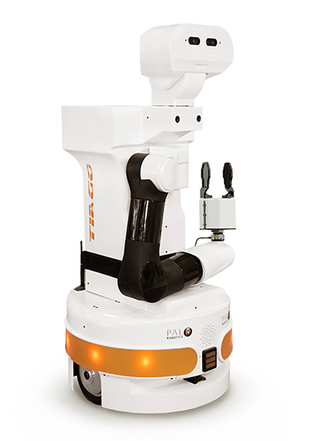
It is the start of the course Social Robot design and this week we will be deciding on a case to work with for the rest of the course. The setting is the ROSE robot (Figure 1.1) in elderly care. I formed a group with Julia Kersten, Michiel van Huijstee, Tjeerd Verschuren and Suzanne Rozendom and together we discussed possible applications for ROSE in elderly care. Possible options we came up with are: 1) Navigation and direction, 2) Measuring tasks, 3) Wayfinding, 4) Household tasks, and 5) Fetching. For these applications there are multiple things we as designers would need to address. For some applications ROSE needs to move around, so how does it move safely? How will it communicate with people it meets on the way? Other questions that need to be answered in the design could be: What needs to be measured with the elderly and how will ROSE approach this? How will it hand things over or put things down? How can Figure 1.1 ROSE robot ROSE determine what needs to be cleaned and how will it proceed to clean? What other household tasks can be done by ROSE? All these questions lead to several preliminary requirements for ROSE:
1. Must act
2. Must understand speech or other forms of communication
3. Must avoid bumping into people
4. Should move comfortably
5. Should move predictable
6. Should move smoothly
We eventually chose to work out ROSE as a fetching robot in elderly care. We started brainstorming on the problem space and created a mindmap. We expanded on this mindmap with possible building blocks and other applications. We then created links between both sides of the mindmap. The end result can be found below in Figure 1.2. Wizard of Oz could be applied to all driving and fetching, meaning that ROSE would be remote controlled to ensure it can drive around and fetch things. It can be translated into a theatrical exercise by trying to ask ROSE to fetch something and show how the interaction between ROSE and the user could proceed.
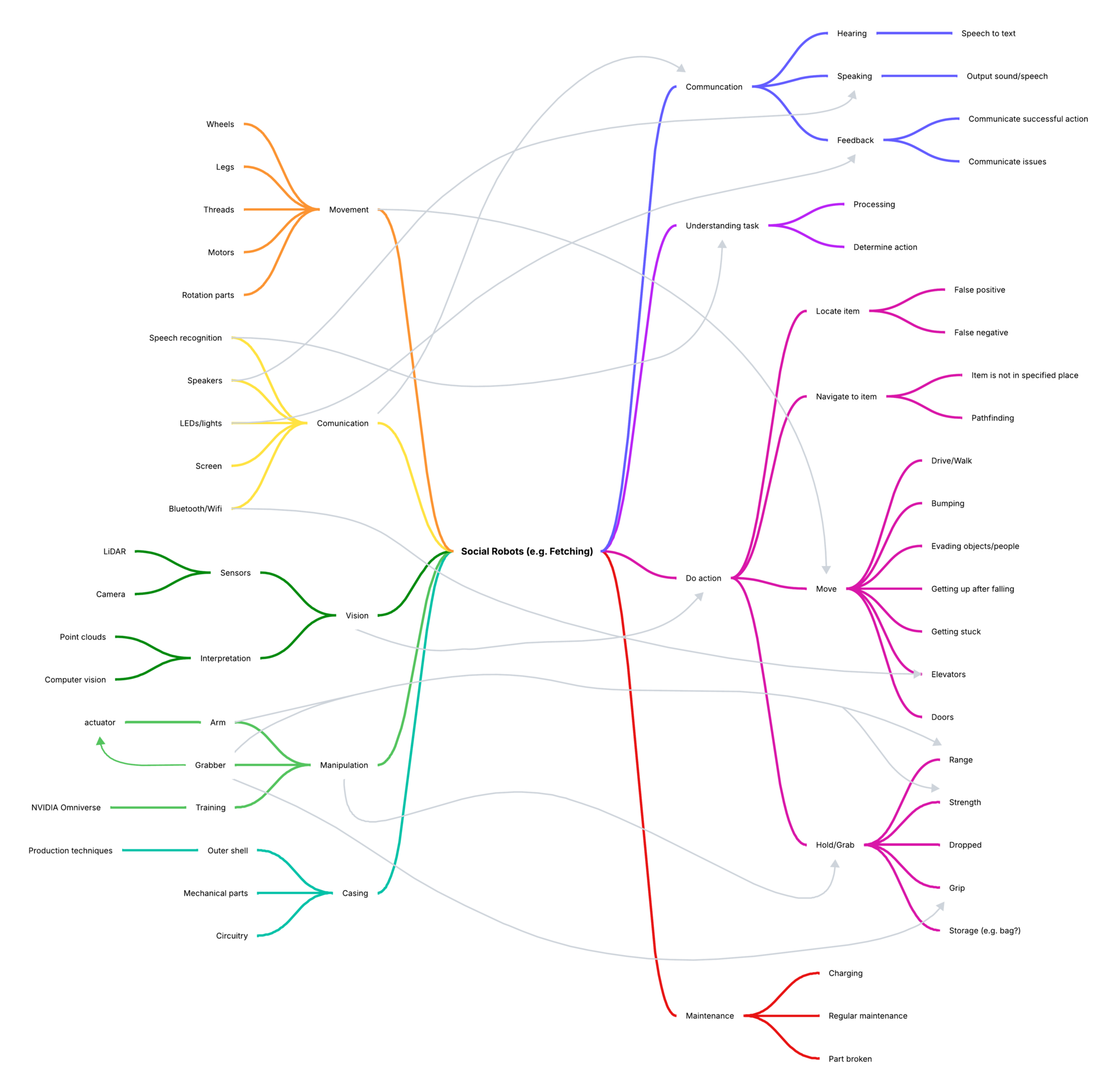
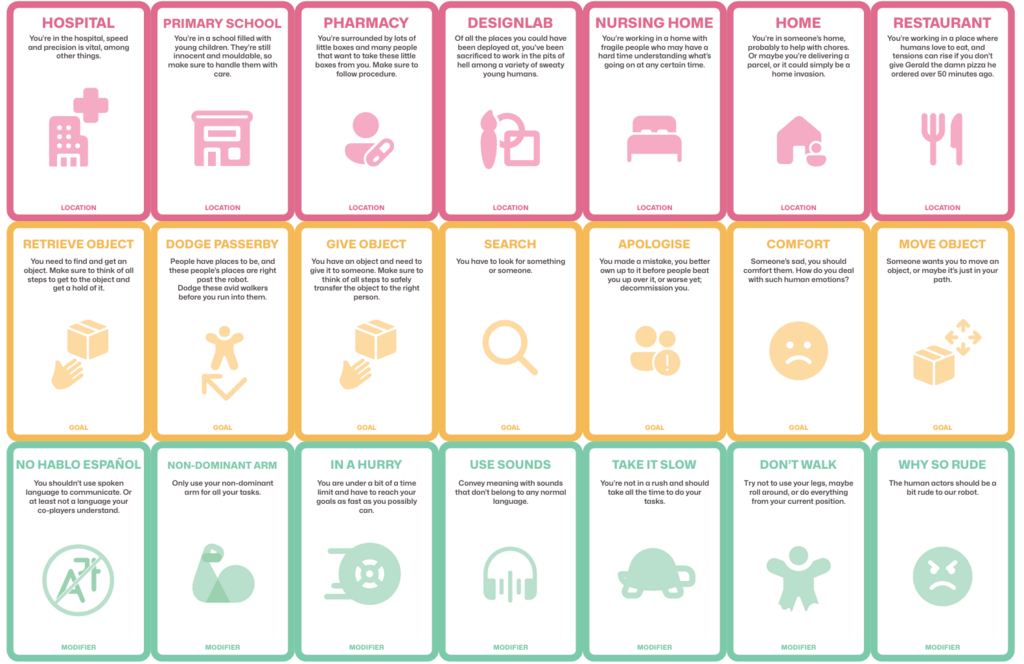
Figure 1.2: The Mindmap
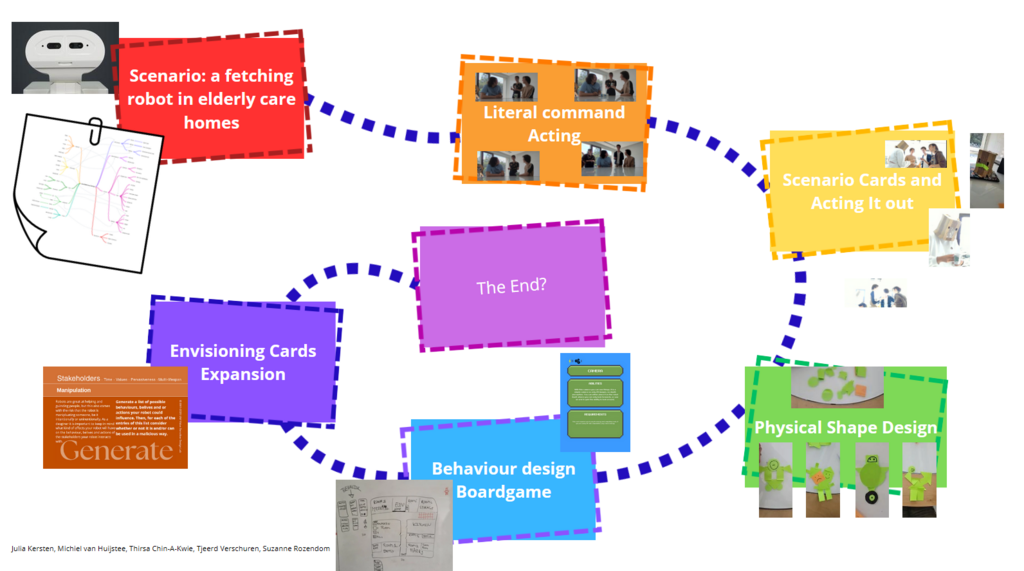
This week we continued with creating a scenario-based design method for social robot design. To address this, we first examined possible tools that already exist, such as storyboarding, improv theater, bodystorming, brainstorming and a vision board and also looked into Botanist writing (planned and structured) VS Gardener writing (start and go with the flow). After having a more clear understanding of the existing tools we started to generate ideas and elements we could use in our own tool. Several ideas were: 1) Use of visuals, 2) Use of music, 3) Incorporate LEGO or Playmobile figures, 4) A Dungeons and Dragons type of storytelling, 5) Finding inspiration in one's surroundings, 5) Creating a comfortable environment and 6) Incorporating game elements.
After a bit of back and forth, we decided to go with a combination of improv theater, instructions and bodystorming as a base for our design method. We created a Literal Command Acting tool, where one person will act as a robot and follow literal commands from the instructor. The layout of the tool looks like this:
1. One person (instructor) defines the goal.
2. (Optional) Define limitations (e.g. can only use 1 hand, no hands, close your eyes, etc)
3. (Optional) Include use of tools, e.g. grippers, containers, wheelchairs, etc.
4. (Optional) Include environmental factors if these are of importance.
5. It is better if the 2nd person (actor) does not know the goal
6. The instructor asks the actor to perform a certain short instruction
7. The actor performs this action as literally as possible
8. Record (in writing or video recording) how the action is performed
9. Try to come up with better ways to define/perform actions/instructions?
10. Repeat until the instructions are able to complete the goal.
With this tool one can act out specific scenarios the social robot could encounter, and see how the story will unfold. In our fetching application, a scenario can be played where the robot fetches something for the elderly or fetches something for the staff if they are occupied with something else. This tool is not necessarily a tool to create different scenarios, but more to analyse the scenario.
We tested our tool with one person as the instructor, one person as the robot actor and two people acting as elderly. A short clip of this can be found below in Figure 2.1 below. The robot actor follows the instructions of the instructor and tries to complete the (to him unknown, but slightly obvious) goal of delivering food to the table of the elderly. After completion the robot actor and the instructor switched roles. A clip of this round is shown in Figure 2.2 below.
Testing the tool helped us to get the scenario we had in mind more clear and gave us the opportunity to examine aspects of the scenario we would not have come across if we only discussed the scenario. By filming our tests, we were able to look back on how we did, and improve where we went wrong.
Figure 2.1: The first test
Figure 2.2: The second test
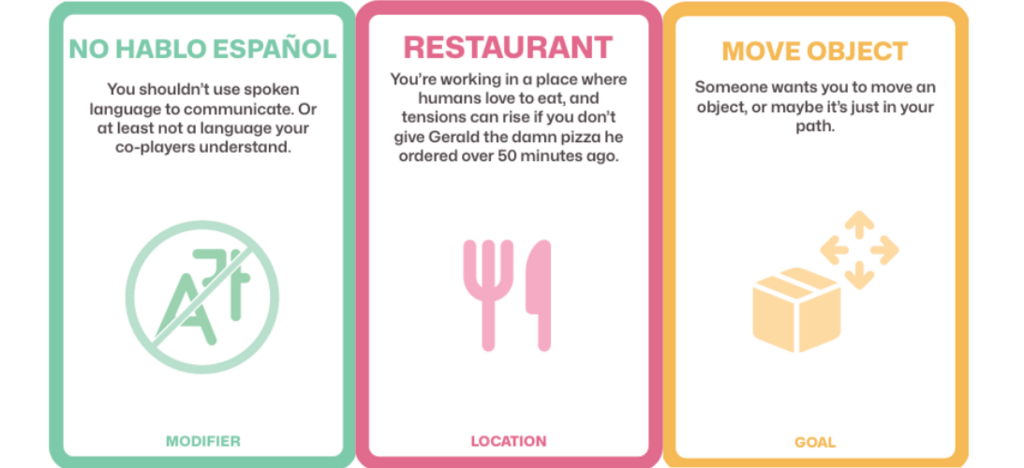
The second tool that we created was to develop expressive behaviour of a social robot. As it is difficult for a ROSE to show emotion on its face, we wanted to lay a focus on expression through the body. This can be done through motion (gestures, movements), sounds, morphology, haptics or a controlled version of ROSE. We discussed how a combination of these categories could help to develop expressive behaviour and what message ROSE would then try to convey. The idea of using sound was also quite interesting as there is a wide variety and range of sounds that could be incorporated. We also thought about combining sounds with improv, where there are several prompt cards and you have to act those out through sound. However, using just sound felt a bit too limited so we expanded on the acting out. The tool provides participants with prompts in three different categories: 1) Location, 2) Goal, and 3) Modifier. The cards can be seen below in Figure 3.1.

Figure 3.1: Tool cards for Location, Goal and Modifier
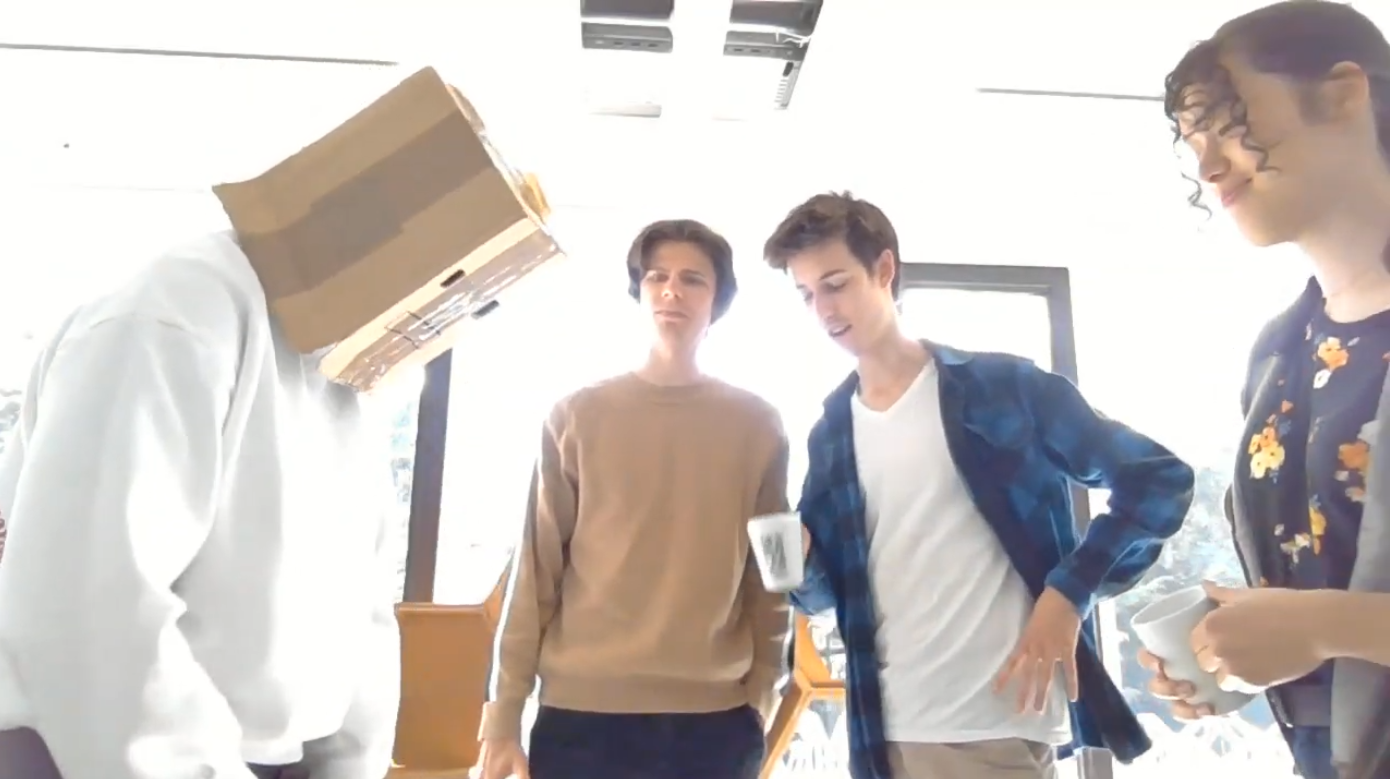
Participants decide on who will act as the robot and who will be actors, and grab at random one card from each category. The actors set the setting and the robot applies the modifier to its capabilities. Then the robot will try to achieve its goal in the given setting, whilst expressing itself through its body and sounds. To create the need to express in that way, we decided to add a small box to be over the robot actors head, so the face will not be part of expression. This also helps to get more into the head of ROSE. By creating this bodystorming environment, designers can really feel what it would be like to be in the scenario and the possible weird combinations help to see things from a perspective that would not have been explored otherwise. If designers already have a specific scenario they want to test, they can leave out the surrounding or goal card and insert their own.

Figure 3.2: The cards used in our test
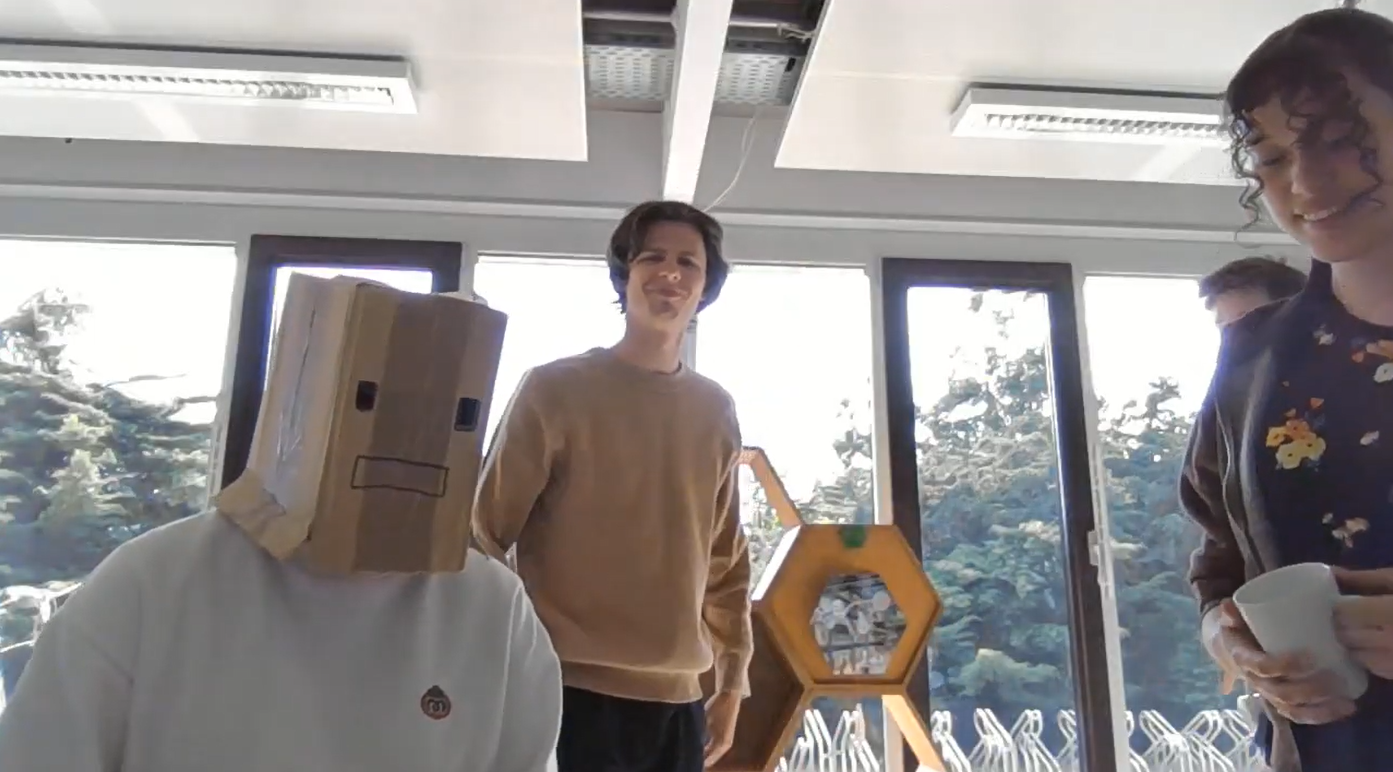
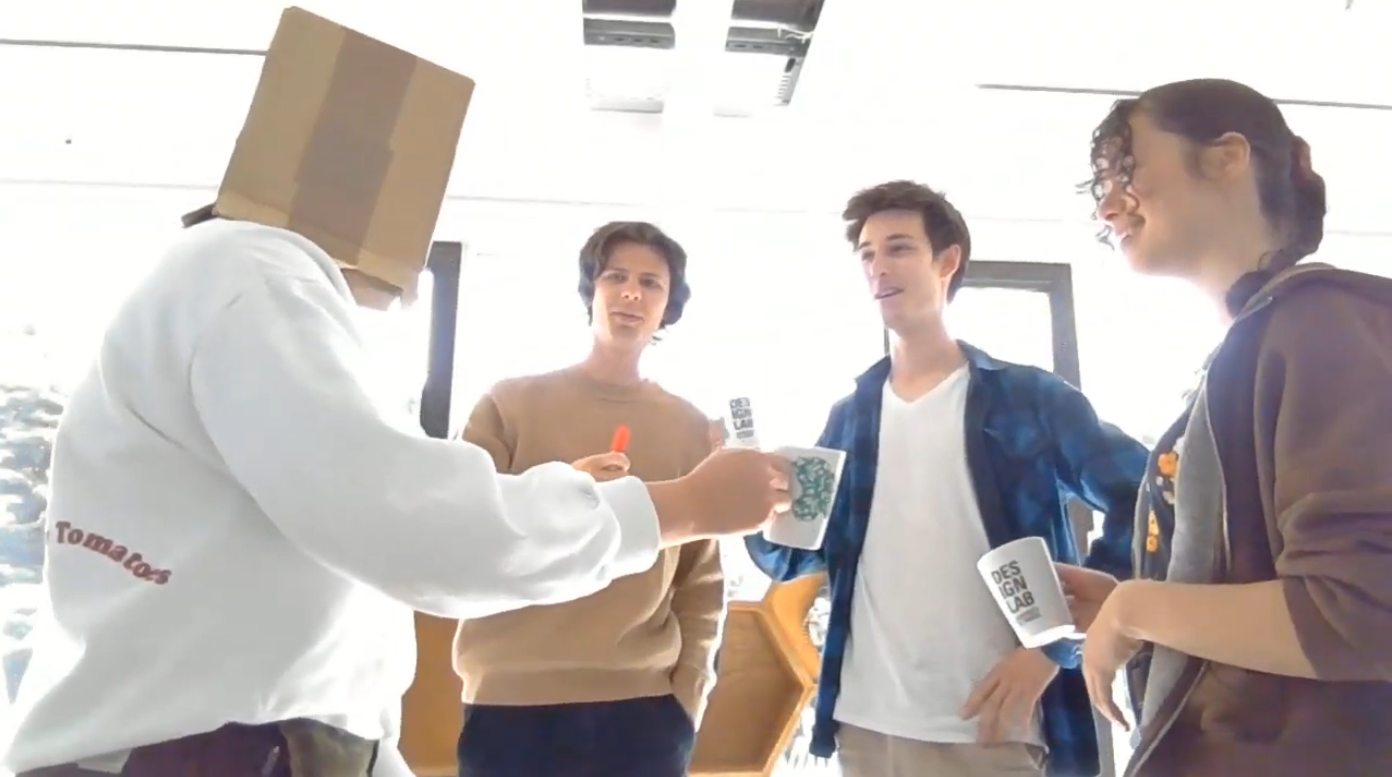
We tested this Robot Expression Tool in our group with the cards of The Restaurant (Location), Does not speak English (Modifier) and Move an Object (Goal), shown in Figure 3.2 above. One person acted as the robot with the box over their head, to remove the facial expression, three other group members acted out a scenario and the last member acted as an observer. Below, in Figure 3.3 till 3.6, are some snapshots and a short clip of our test.

Figure 3.3: Testshot 1

Figure 3.4: Testshot 2

Figure 3.5: Testshot 3
Figure 3.6: Clip of second test
We tested this scenario twice, both slightly different, to explore different angles in the use of expression.The tool is both easy and fun to use and has a very low threshold. It showed that sounds are a good and simple way to express, even if words cannot be used. Additionally, jittering or unease is easily understood by humans and they can act on that. This is according to the paper by Hoffman & Ju [1], who state that humans are very sensitive to motions from both humans and objects or in this case Social Robots. Our tool has really shown this and this can be applied to ROSE in healthcare
When checking out some state of the art on Social Robot projects, it becomes clear that the majority of those projects still use Pepper or Nao as their Social Robot. We created a morphological overview of elements in a Social robot. This can be found in Table 4.1 below.
| Morphology | Human-like | Simple Shapes | Animal-like | Traditional Robot Design | Custom Design |
| Face | Screen | Morphological eyes | Motorized facial features | - | - |
| Colour | White | Accents | "Natural" | Party | - |
| Motion | Static | Fluid | Breathing | Jitters | Animated |
| Voice | Noises | Flat | Expressive | - | - |
| Size | Toy size | Desktop size | Child size | Human size | Even larger |
| Locomotion | Legs | Wheels | Threads | - | - |
| Location | Classroom | Library | Home | Office | Restaurant |
| Users | Teachers | Librarians | Homeowner | Employees | Guests |
| Goal | Education | Organisation | Cleaning | Emotional support | Serving |
Table 4.1: Morphological overview
There are some specific combinations that create unwanted scenarios, such as an educational robot that only uses beeps to communicate with others, but theoretically speaking, it is still possible to create a Social Robot.
The question remains: How to aid designers to prototype different and novel embodiments? That question we are trying to answer this week. We did a quick brainstorm in the group where we came up with elements such as use of words, drawings, LEGO, tinkering, creating something physical, 3D modeling and cardboard. We realised that we wanted to create a tool that makes use of low level prototyping to ensure designers can quickly add and remove parts, without getting too attached to the design.
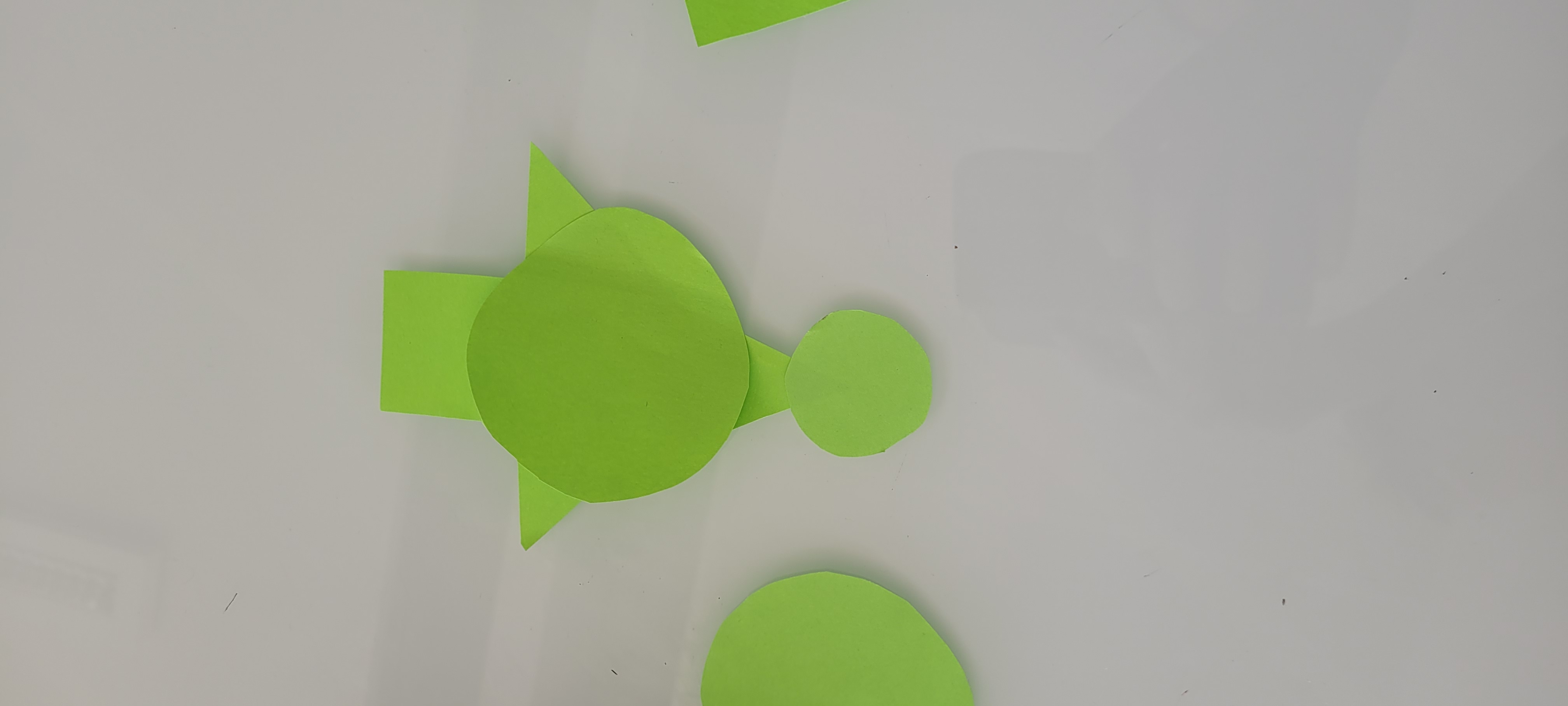
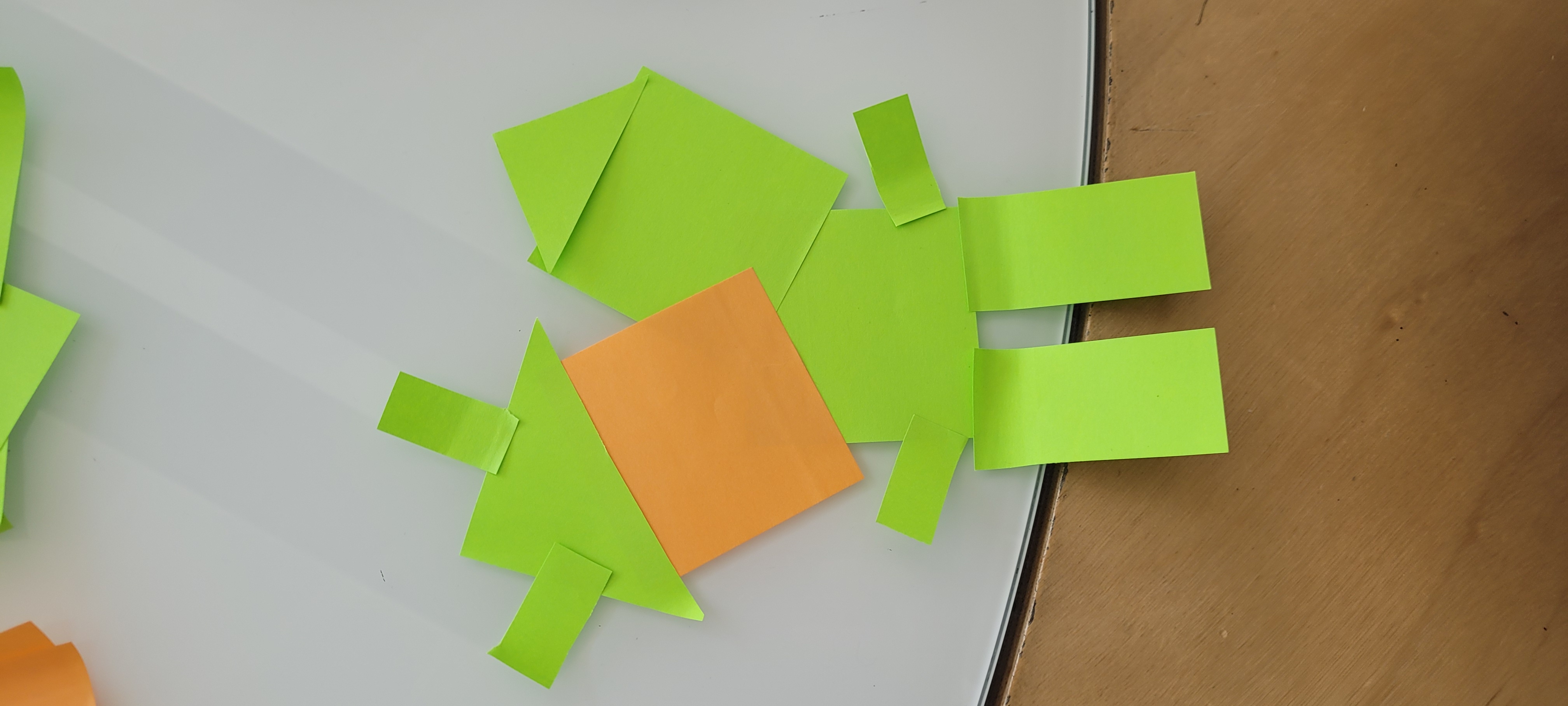
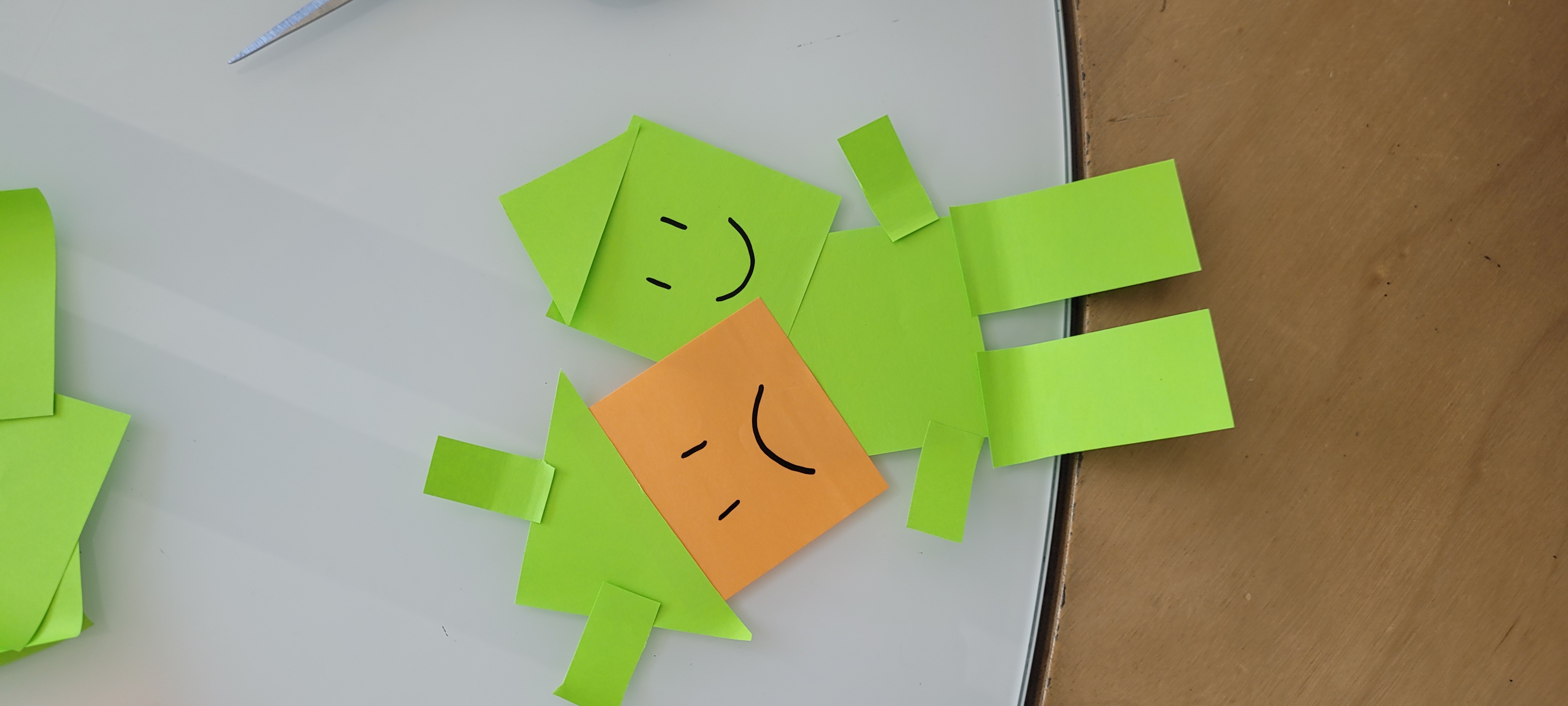
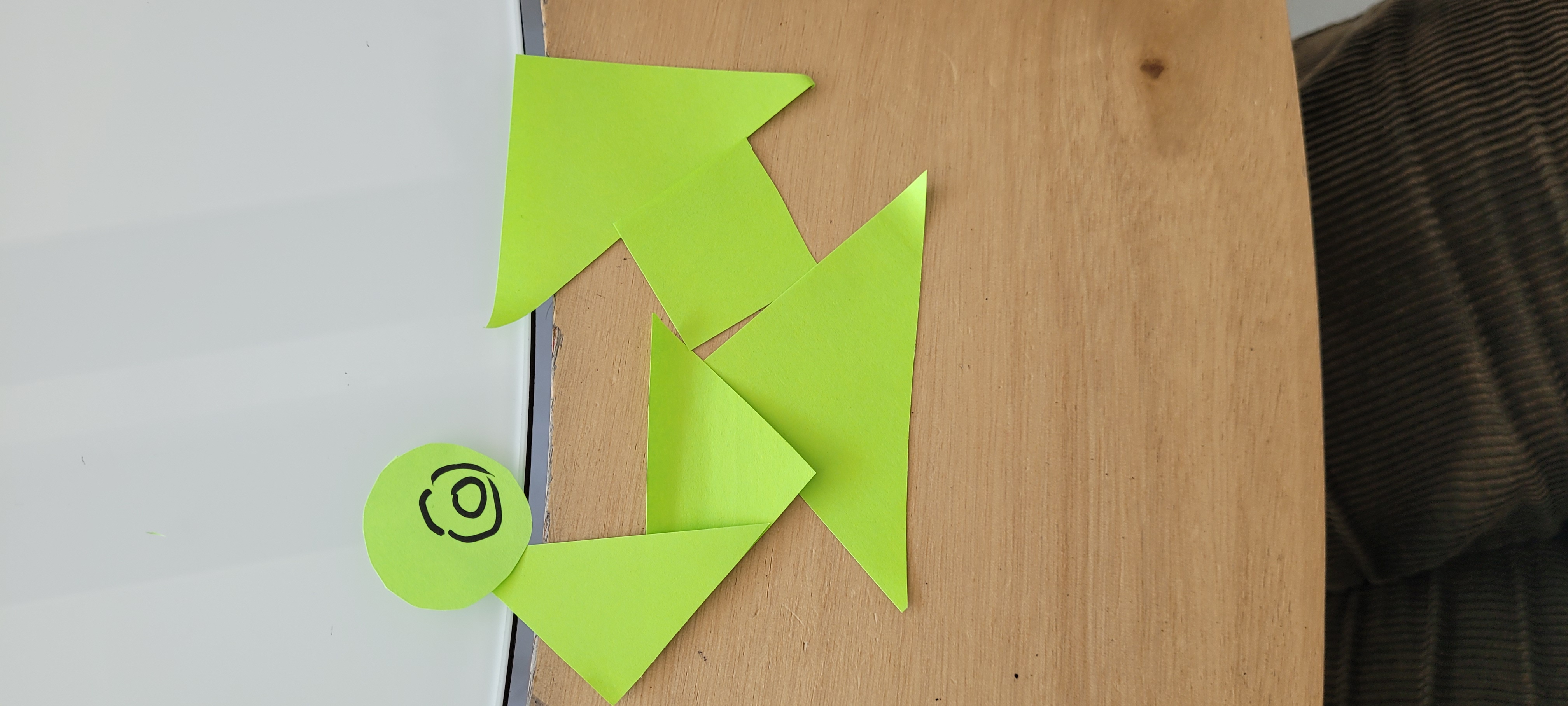
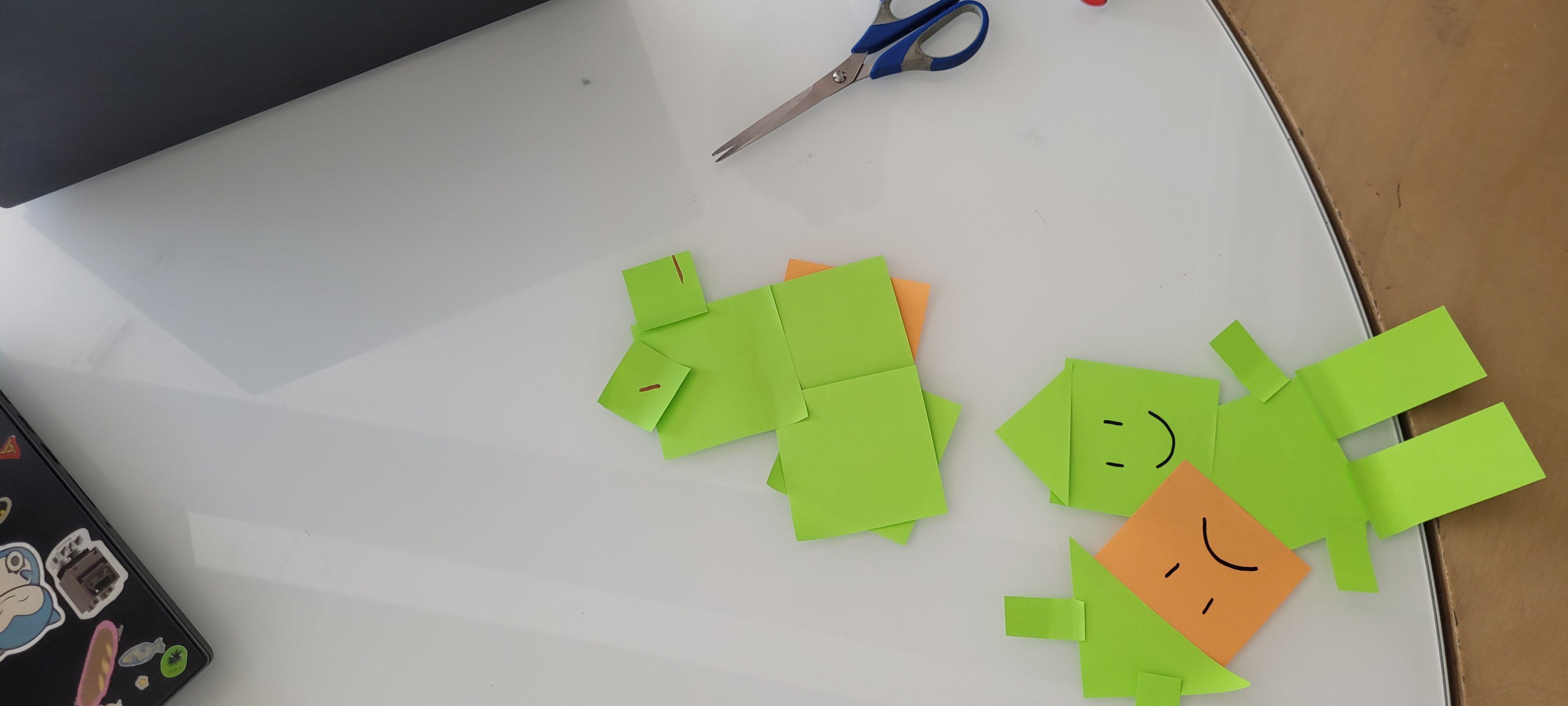
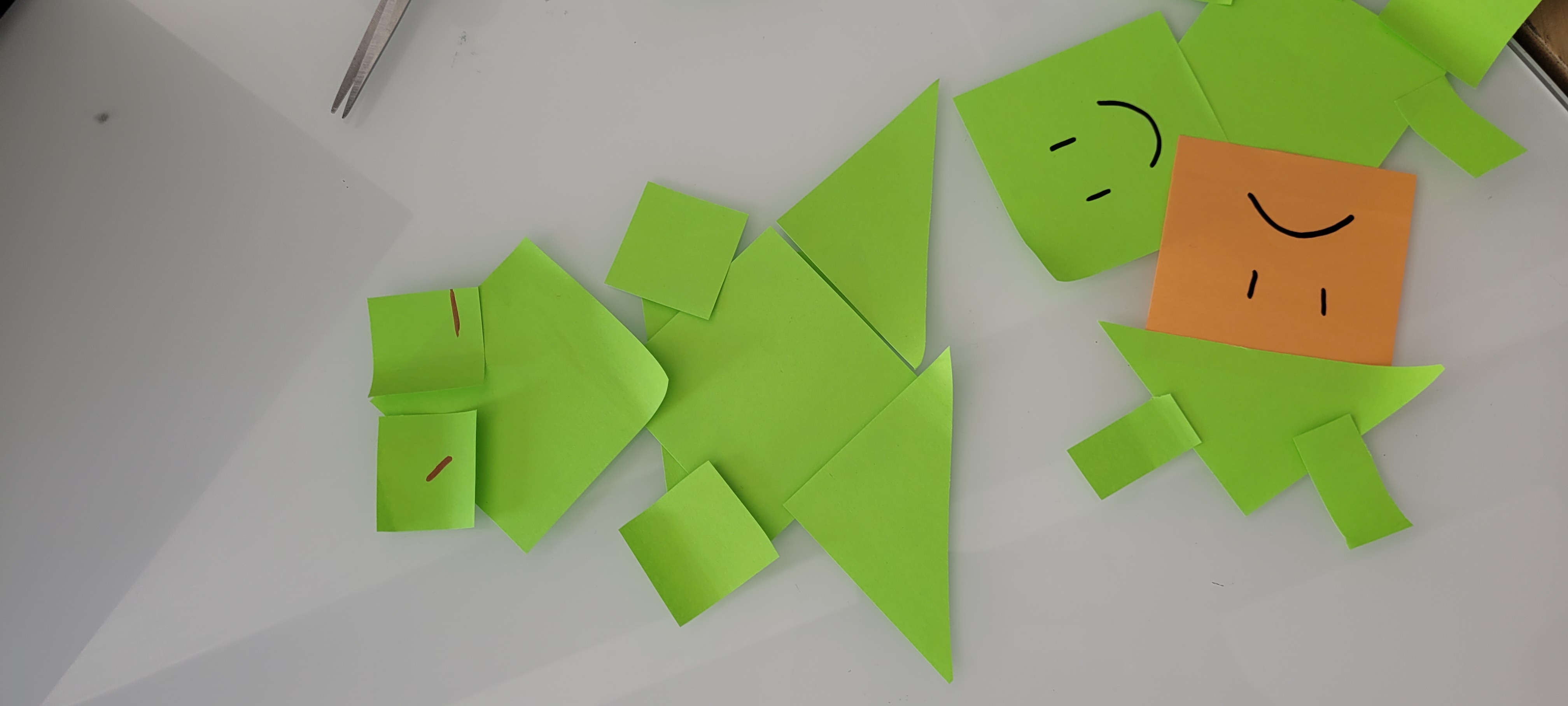
Eventually, in the spirit of simplicity, the final tool consists of a lot of different basic paper shapes that designers can combine into any form they want. The use of paper makes it easy to set up and move around and it can be easily modified by drawings of the designers. The setup can be seen below in Figure 4.1. This tool allows for full creative freedom and allows designers to be inspired by simplicity. A similar approach has been done by Voges et al. [5A] who created a creative toolkit for the embodiment of Social Robots. Their kit does contain more robotic shapes, but they also reflect that using those limits the amount of novel ideas. Voges et al. found that the use of the kit allows for a creative approach and has a low threshold even for those without a Social Robot background.

Figure 4.1: Embodiment tool
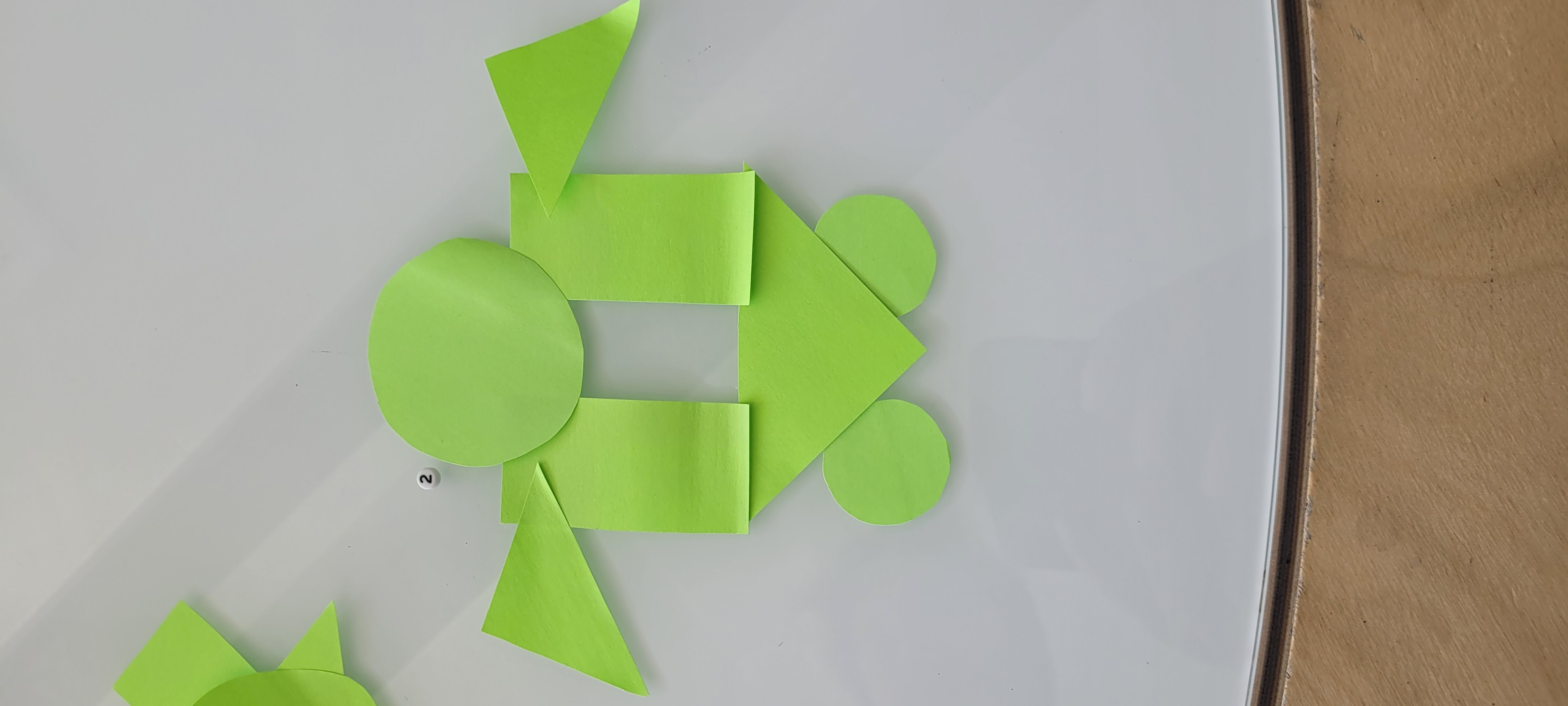
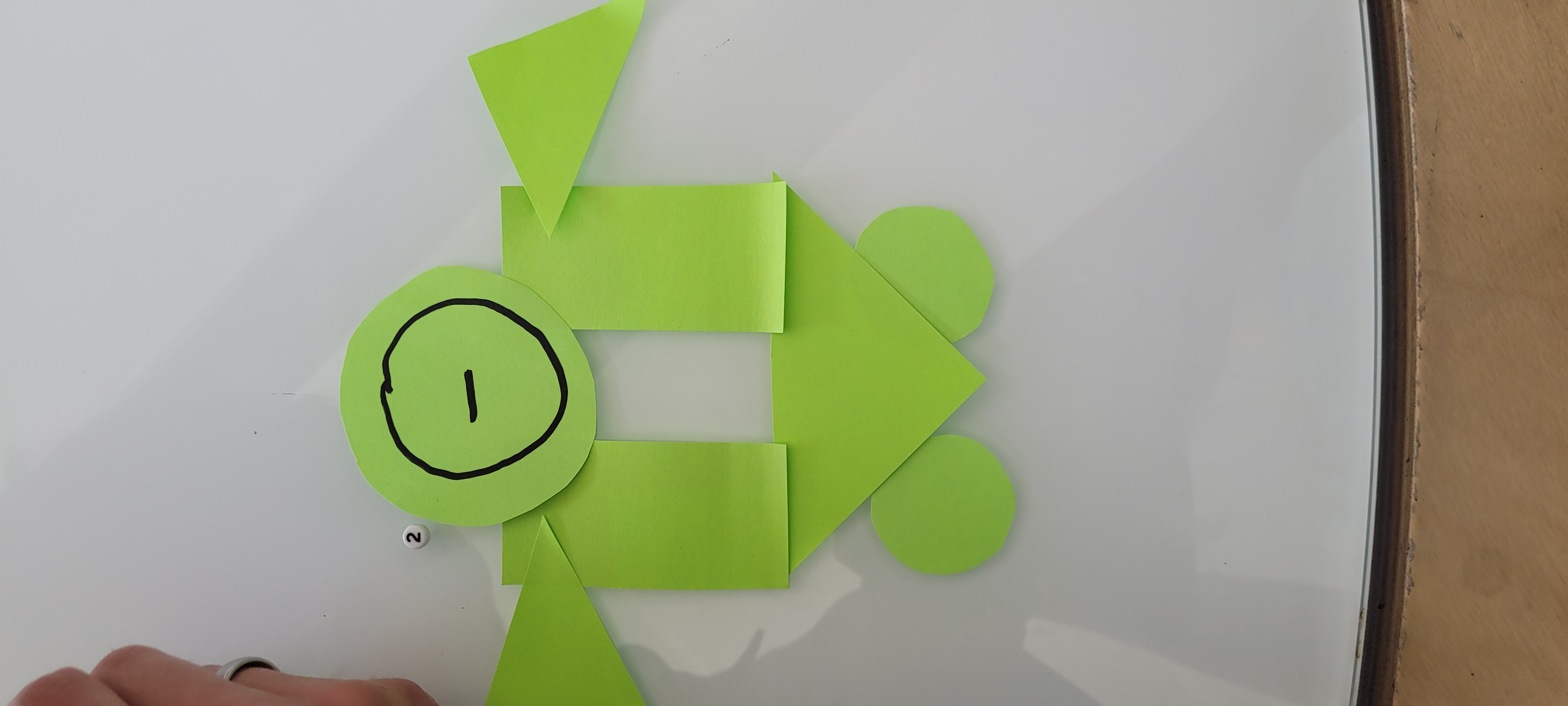
We tested out the tool ourselves, and were quickly amazed by the level of diversity in the outcomes of our personal robot embodiments. The different results can be found below in Figures 4.2 till 4.10. As can be seen, all participants took a different approach even with the same limited amount of shapes available. We took the liberty to add drawings to the designs, to make them more personal and more clear and to extend beyond the basic shapes. This is also seen in the results from Voges et al. [2] where half the designs were complemented with personal elements. This shows that the simplicity of the design allows for more interpretations and extends the creative horizon. Sanoubari et al. [3] conducted research where they let children design their own robot and bring it to life with their own story. The robots created were very Lo-Fi due to use of leftover material and cardboard, but by adding on their own drawn on faces and decorations, the robots became very personal and lively. This is what we also aimed to achieve.

Figure 4.2: Inital first design 1

Figure 4.3: Custom design 1

Figure 4.4: Initial design 2

Figure 4.5: Custom design 2

Figure 4.6: Initial design 3

Figure 4.7: Custom design 3

Figure 4.8: Custom design 4

Figure 4.9: Inital design 5

Figure 4.10: Redefined design 5
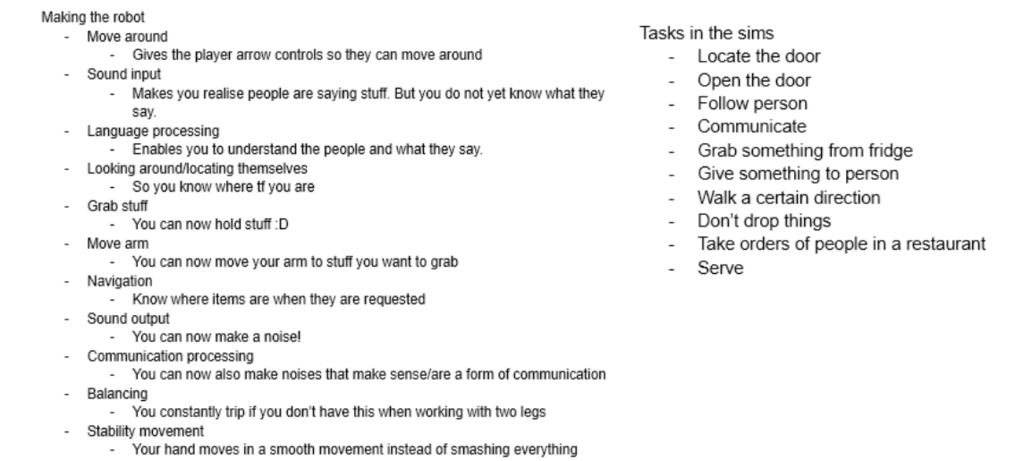
This week's challenge is to create a tool that will help prototyping (high level) robot behaviour, preferably without the use of Wizard of Oz. As we did not want to make use of Wizard of Oz and getting an actual robot was a bit expensive, we started to look into virtual robots. Our initial idea was to create a tool that would allow users to design and test their robot in a Sims like universe: 1) One would first program and design their own simple robot. 2) Once finished they receive tasks to complete. 3) Doing these tasks would give insight into the behaviour of the robot and what is still missing.

Figure 6.1: Robot parts & Robot tasks
In Figure 6.1 above it shows different robot parts and the tasks that the robot could get.
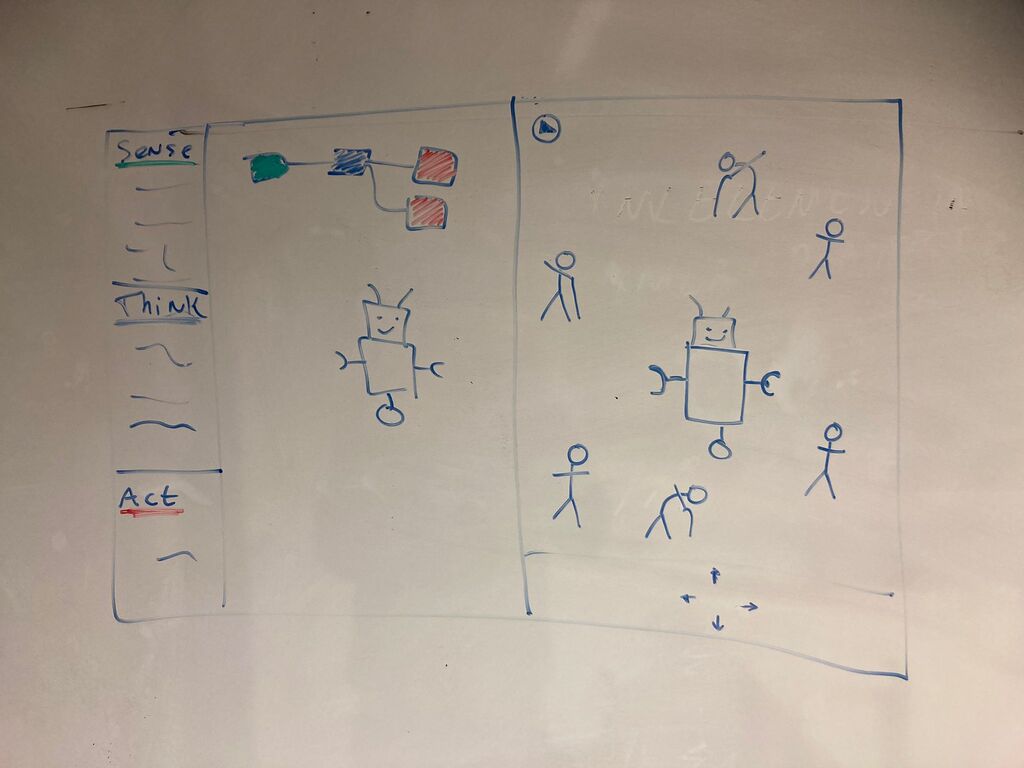
However, we would not be able to create this in 2 weeks and a paper prototype would not do it justice. Therefore, we moved on to a more game-like environment with the same base. The game would show a split screen, on the left a player can customise and upgrade their robot, and on the right the player sees their robot and has to perform a small task. A sketch is shown in Figure 6.2 below. This takes inspiration from games such as Chipwits and Mindrover.

Figure 6.2: Sketch of initial idea
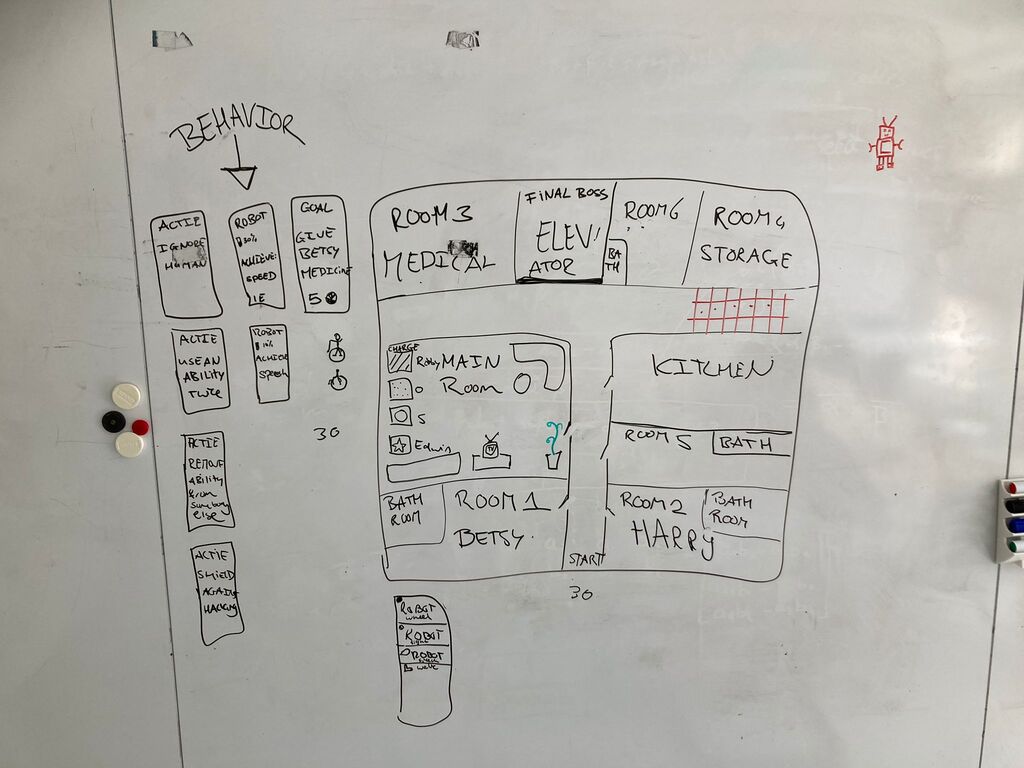
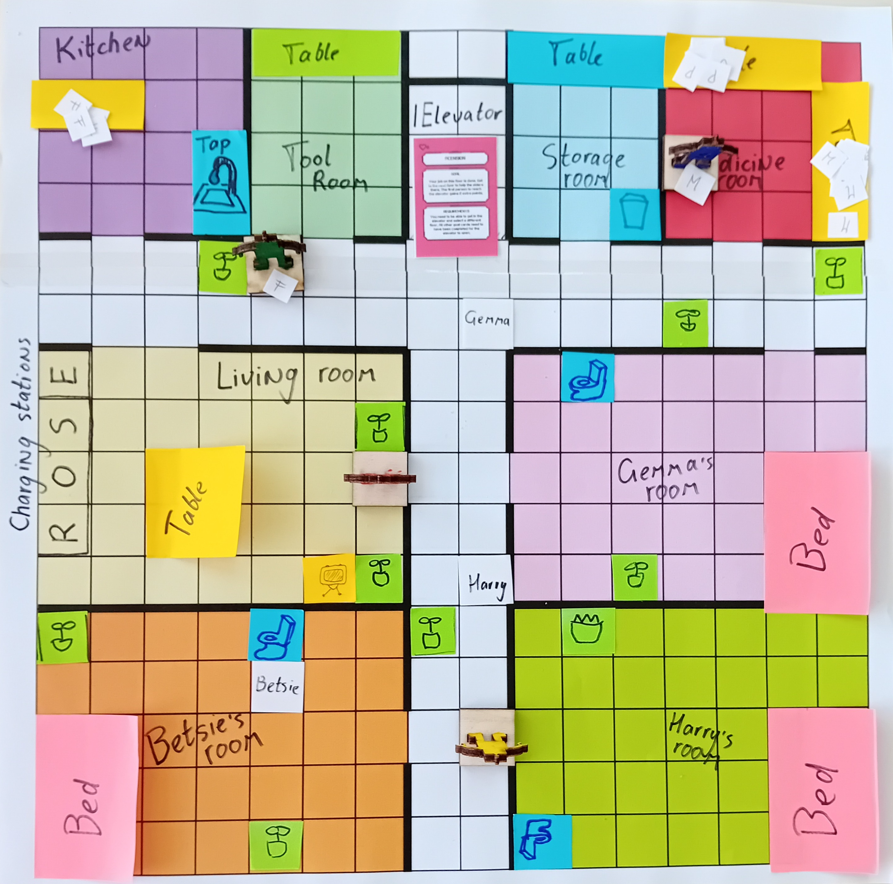
A game environment did feel more fitting and was closer to what we wanted to achieve, but creation of an online game is still quite a handful to do in the limited time we still had. We eventually settled on our final design for the tool: a board game. The possible effectiveness of a serious board game is shown by Sousa [4], who even adapted existing board games into serious board games, with positive results. The first sketch made during brainstorming is shown below in Figure 6.3. The board itself is the space where the robot is designed for, in our case an elderly home. It has different rooms and spaces such as personal rooms, a kitchen and a medical bay. The final ‘boss’ is to be able to enter the elevator.

Figure 6.3: Sketch of board game idea
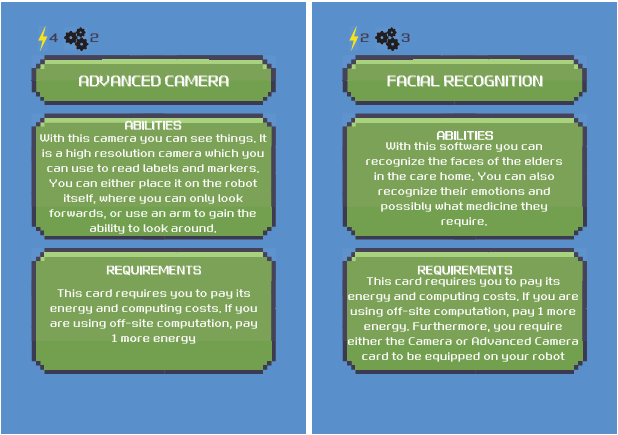
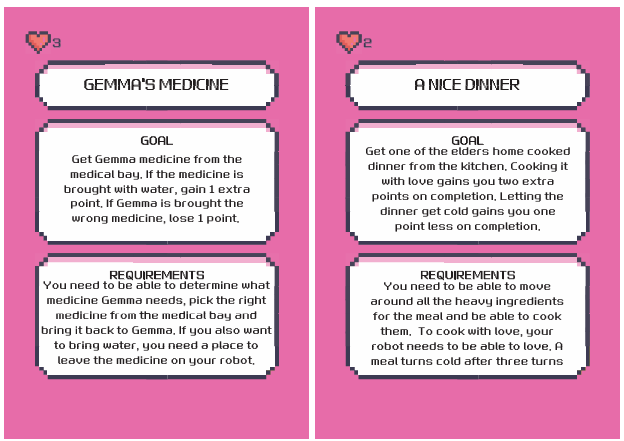
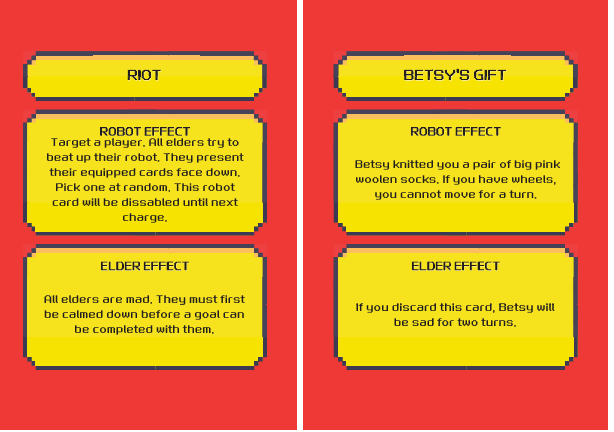
Here you can get a more detailed explanation of the board game, but in short: designers take their own robot figure and gather parts (Figure 6.4) to try and finish the goal cards. The different goals need different parts on the robot in order to be able to accomplish them correctly. An example is shown in Figure 6.5. There are also events that could happen that deal with unexpected behaviour of the elderly, which should also be taken into consideration when designing behaviour for a social robot (see Figure 6.6). With our board game, we go in the same direction as Mott et al. [5], who created a game called ‘Degrees of Freedom’, encouraging players to think about the Social robot they design.

Figure 6.4: Part cards

Figure 6.5: Goal cards

Figure 6.6: Action cards
We created the board and the pieces (Figure 6.6) and came up with several rules which would guide the players and made a layout of the turns that the players would be taking. There are however still some aspects that need some fine tuning, such as the precise amount of steps that can be taken per turn and the balancing of the action and goal cards. Because we did not have the time to extensively playtest the game several times, and have others test the game to see if the game elements are in balance for those that did not develop the game, we cannot make any statements about the effectiveness of the game in this current state. With time however, the game can be optimised and possibly expanded to fit the goal of prototyping Social Robot Behaviour and hopefully be as effective as Degrees of Freedom [5]. In its current state, the game is fun and helps players to think about robot components and possible scenarios the Social Robot could encounter and what type of behaviour is needed in said scenario, and what parts are necessary to act out that behaviour.

Figure 6.6: The board game
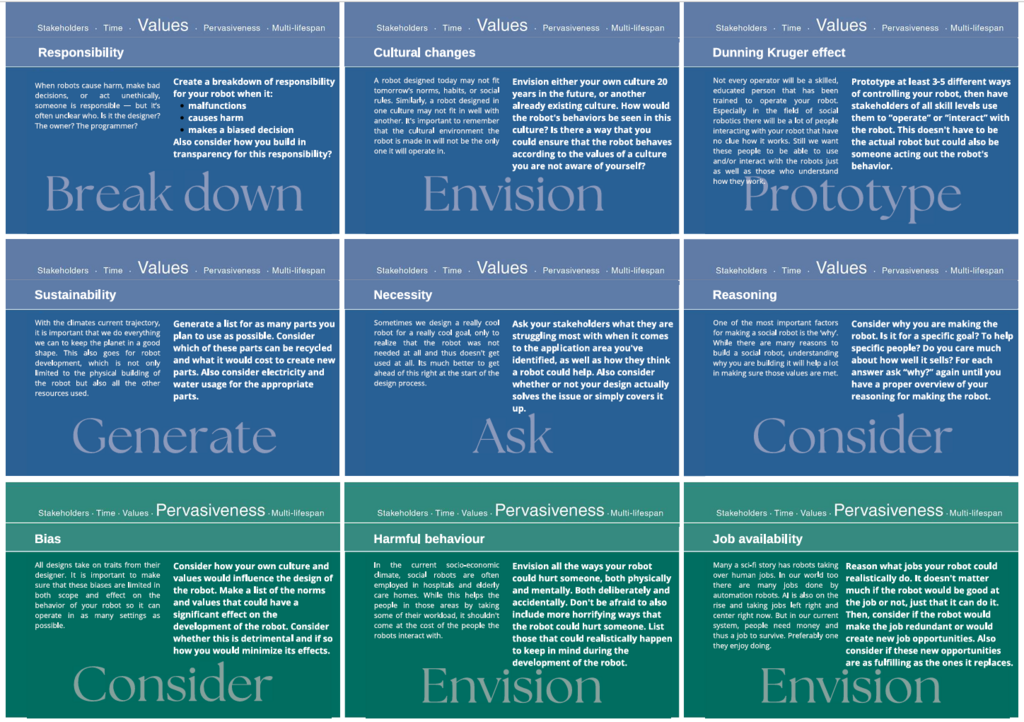
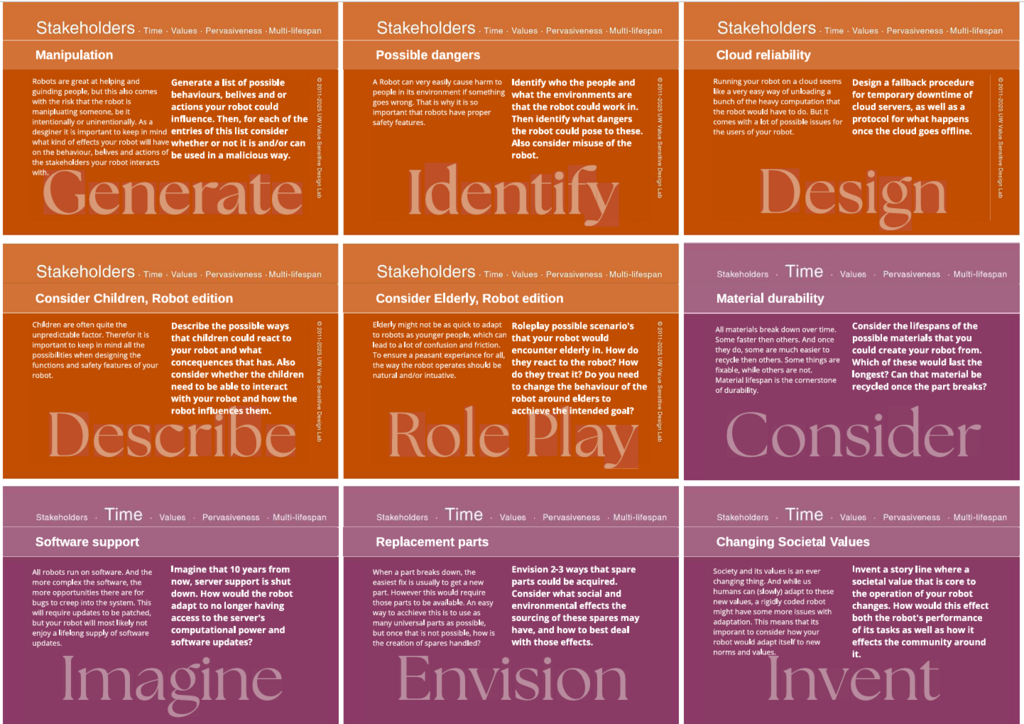
A very important topic when designing Social Robots is Ethics. Therefore, this last tool will focus on exploring both long and short term ethical implications of Social Robots and invoke discussions between the designers. For this tool we were invited to expand on the Envisoning Cards by Friedman [6]. We wanted designers to think about the things they did not know or think about. Within the categories these cards present, (Stakeholder, Time, Pervasiveness, Values) we created thought provoking questions (see Figure 7.1 below). Asking interesting questions to examine ethical concerns has also been done by Mei et al. [7], where they focussed more on the ethical concerns in regards to robots in healthcare. To create more interesting and unique scenarios, we added an option where designers could pick two cards at random which would create a scenario. So for example: Elderly (stakeholder) and Safety features (Stakeholder) invites them to think about safety features implemented when the Social Robot is interacting with Elderly. Designers are invited to name all the things that could go wrong, or how the robot could be unethical. If there is no new input, they can swap out one of the cards or pick two random new ones. They can also pick a few cards that apply to their own scenario if they already have one. However, picking cards at random and creating (sometimes unrealistic) new scenarios does give food for thought on things that would otherwise not have come up.


Figure 7.1: Ethics cards based on the Envisioning Cards
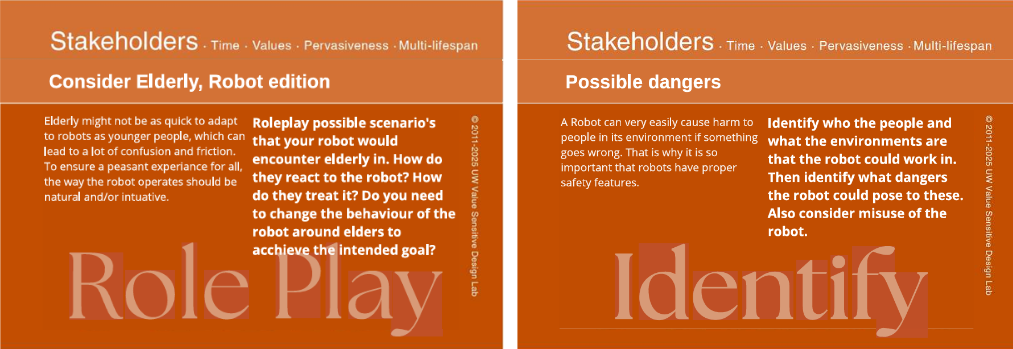
We tested this tool within our group. The first two cards that we got were: Elderly (Stakeholders) and Safety features (Stakeholders), which can be seen below in Figure 7.2. The questions helped to get the conversation started and we quickly expanded in several different directions with concerns as: Will the elderly be recorded when conversing with the robot? Would elderly be prone to share personal information, which could be leaked or used to scam the elderly? Will the robot be a safety hazard for elderly, causing tripping or bumping into them? But we also thought about Safety Features for the robot, like airbags.

Figure 7.2: Ederly and Safety Features cards
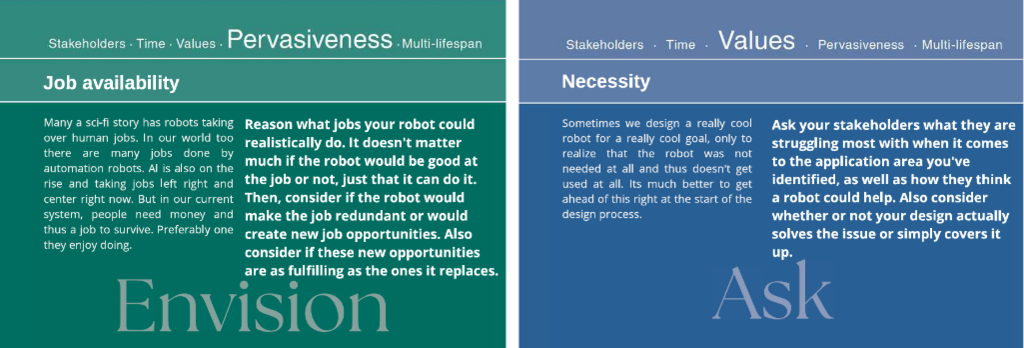
We then moved to a new round of discussion about the Job Availability (Pervasiveness) and Is the robot needed for this issue? (Values), which can be found in Figure 7.3. With these topics we discussed the scarcity in healthcare employees and how the robot could potentially do the redundant jobs that are easy but take up some time, like cleaning or a portable toilet. If the robot could actually relieve people of the parts of the job they do not want to do, healthcare jobs might also become more interesting for people that were thinking about going in that direction.

Figure 7.3: Job Availability and Necessity cards
The outcomes of our conversations show that the cards with the questions can function as a nice way to start the ethics conversation. The insights gained were interesting and sometimes a bit unexpected. The questions and insights align with the results from Mei et al [7], who also found concerns for patient safety and privacy. The topics of Physical Safety, Data security and Transparency were among others also part of an Ethical Considerations canvas presented by Axelsson et al. [8]. They created a sheet with space for both the problem and solution for the concerns. It invites users to think about the problem from both a user and a designer perspective.
During our discussions we did notice that it is easy to get sidetracked in the conversation. Therefore we would advise having one person to be a discussion leader, to ensure that there is not too much time wasted on irrelevant topics. A little sidetracking can however also inspire and help with thinking outside the box, with the advantage that it keeps the conversation fun and interesting. Based on the approach of Axelsson et al. [8] it could also be nice to add a space where the discussion can be written down and examined later, or to record the session.

Figure 9.1: The poster
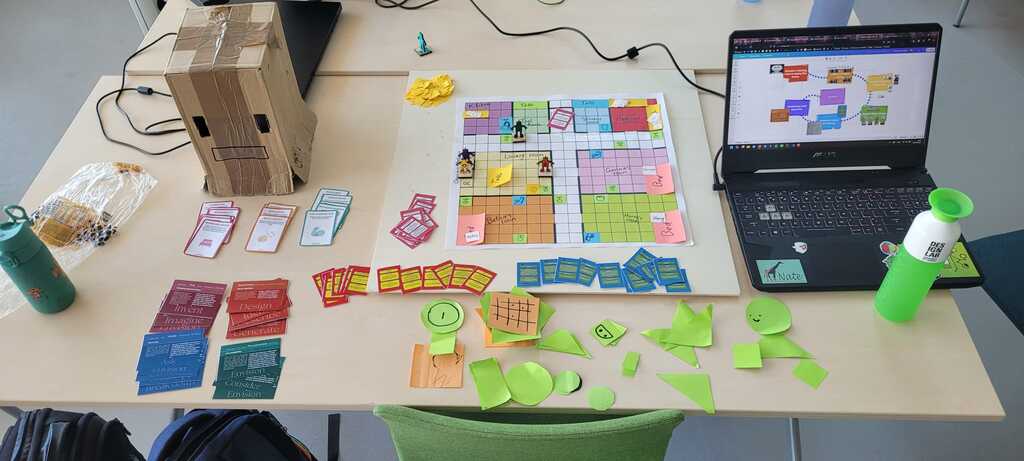
To show the work from past weeks we created a simple visual poster, shown above in Figure 9.1. Sadly a few pictures were overexposed, which limited the visibility of the images. The poster shows the results from each week and during the pitch we explained what tools we created. After the pitches there was a Demo, where I stayed with our tools and helped explain and show them to the people that came by. We had all the tools on the table (Figure 9.2) and the poster next to it on a laptop screen. It was very fun to be able to share our weeks of work with others and get some positive feedback on the results. After three rounds of demo, the course was officially over and the final result is in this portfolio.

Figure 9.2: All the tools together
[1] G. Hoffman and W. Ju, “Designing robots with movement in mind,” Journal of Human-Robot Interaction, vol. 3, no. 1, p. 89, Mar. 2014, doi: 10.5898/jhri.3.1.hoffman
[2] A. Voges, M. E. Foster, and E. S. Cross, “Human, Animal, or Machine? A Design-Based Exploration of Social Robot Embodiment with a Creative Toolkit*,” IEEE International Conference on Robot and Human Interactive Communication (RO-MAN), pp. 1331–1338, Aug. 2024, doi: 10.1109/ro-man60168.2024.10731416.
[3]E. Sanoubari, J. E. M. Cardona, H. Mahdi, J. E. Young, A. Houston, and K. Dautenhahn, “Robots, Bullies and Stories: A Remote Co-design Study with Children,” Interaction Design and Children, pp. 171–182, Jun. 2021, doi: 10.1145/3459990.3460725.
[4] M. Sousa, “Serious board games: modding existing games for collaborative ideation processes,” International Journal of Serious Games, vol. 8, no. 2, pp. 129–146, Jun. 2021, doi: 10.17083/ijsg.v8i2.405.
[5] T. Mott, M. Higger, A. Bejarano, and T. Williams, “Degrees of Freedom: A Storytelling Game that Supports Technology Literacy about Social Robots,” IEEE International Conference on Robot and Human Interactive Communication (RO-MAN), pp. 2095–2102, Aug. 2024, doi: 10.1109/ro-man60168.2024.10731340.
[6] B. Friedman and D. Hendry, “The Envisioning Cards: a toolkit for catalyzing humanistic and technical imaginations,” CHI ’12: Proceedings of the SIGCHI Conference on Human Factors in Computing Systems, pp. 1145–1148, May 2012, doi: 10.1145/2207676.2208562.
[7] Z. Mei et al., “Ethical risks in robot health education: A qualitative study,” Nursing Ethics, Aug. 2024, doi: 10.1177/09697330241270829.
[8] M. Axelsson, R. Oliveira, M. Racca, and V. Kyrki, “Social Robot Co-Design Canvases: a Participatory Design framework,” ACM Transactions on Human-Robot Interaction, vol. 11, no. 1, pp. 1–39, Oct. 2021, doi: 10.1145/3472225.